
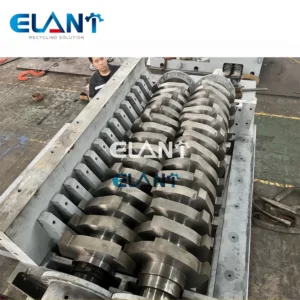
A neglected plastic grinder blade loses up to 40% of its cutting efficiency[1] within 300 operating hours — meaning a machine rated for 500 kg/h starts struggling to hit 300 kg/h, burning more motor amperage and generating heat that deforms the plastic flake. Plastic grinder machine blade maintenance is the single highest-return task in any recycling or injection-molding prep line. These are the essential maintenance tips our technicians recommend based on service calls to U.S. recycling and compounding facilities — seven steps that ensure blades stay sharp, seats stay clean, and throughput numbers stay honest.
Quick takeaways
- Inspect shredder blades every 8 operating hours; sharpen or rotate every 200–300 hours depending on material hardness — these are essential steps for optimal performance.
- Clean the grinding chamber and blade seats after every shift to ensure compacted fines don’t accelerate wear.
- Lubricate bearing housings on a fixed weekly schedule — not “when they squeak.”
- Torque blade bolts to spec (typically 35–55 Nm for M10 stainless hardware) every time a blade is reinstalled to ensure flat seating.
- A full blade maintenance cycle — clean, inspect, lubricate, re-torque — takes roughly 45 minutes and can extend blade lifespan from 6 months to over 18 months in HDPE applications.
Before you start
Knowledge prerequisites: ability to read a torque wrench, basic familiarity with lockout/tagout (LOTO) procedures, and comfort identifying the four main grinder components — rotor blades, stator/bed knives, the grinding chamber screen, and bearing housings.
Tools and materials you’ll need:
| Item | Specification |
|---|---|
| Torque wrench | 0–100 Nm range, ±3% accuracy |
| Hex key set | M6–M16 metric (common blade bolt sizes) |
| Wire brush | Brass bristles — steel scratches blade seats |
| Parts cleaner / degreaser | Non-chlorinated, OSHA-compliant solvent |
| Feeler gauge | 0.02–0.5 mm range for blade gap measurement |
| Bearing grease | NLGI Grade 2, temperature-rated to 150°C |
| Replacement O-rings / seals | Match to your specific machine model |
| Personal protective equipment | Cut-resistant gloves (ANSI A4 minimum), safety glasses, LOTO padlock |
⚠️ Warning: Blades retain stored rotational energy even after power-off. Never open a grinding chamber without completing a full LOTO procedure and waiting 90 seconds for the rotor to reach a full stop. It is crucial that both electrical and pneumatic energy sources are isolated — on machines with both, OSHA 29 CFR 1910.147 lockout tagout standard requires a written procedure covering every energy source. If your facility doesn’t yet have one for this machine, it’s worth the hour to write it before the next blade change.
Step 1: Lock out, tag out, and clear the chamber
Why this matters: Grinder maintenance injuries in U.S. facilities[2] are traced to partial LOTO compliance — a single phase de-energized while hydraulics or pneumatics remain live. Clearing the chamber first removes any residual plastic material that could shift under the weight of a blade or tool.
- Press the machine’s Emergency Stop, then follow your facility’s LOTO procedure: disconnect main power at the breaker, apply your personal padlock, and hang your tag.
- Open the chamber access door. Using a shop vacuum or compressed air (safety glasses on), remove all plastic fines, chunks, and dust from the grinding chamber.
- Visually confirm the rotor has stopped — watch for zero movement for at least 10 seconds before reaching inside.
- Place a rubber mat under the access opening to catch any hardware you drop during the inspection.
Common mistake: Teams skip the chamber vacuum and reassemble over compacted fines. Those fines pack behind blade bolts and create micro-vibration that strips bolt threads within 50 hours.
Step 2: Inspect shredder blade edges and measure blade gap — essential plastic grinder machine blade maintenance
Why this matters: A blade that looks dull visually may still be within spec — or a blade that looks acceptable may have a 0.3 mm chip that makes it functionally useless for clean plastic shredding. Measurement replaces guesswork.
- Using cut-resistant gloves, remove each rotor blade one at a time. Set removed blades in order on a padded surface so you can reinstall them in the same orientation.
- Examine each cutting edge under a work light at a low angle. Chips, rolled edges, and flat spots wider than 0.5 mm indicate a blade that needs sharpening or replacement.
- Reinstall one blade temporarily and use a feeler gauge to measure the clearance between the rotor blade and the stator/bed knife. For most plastic grinders processing HDPE, PET, or ABS, the optimal gap sits between 0.10 mm and 0.25 mm. Gaps wider than 0.3 mm produce long, stringy flake rather than clean granules.
- Record your readings in a log — date, blade gap left/center/right, operator initials. A paper card attached to the machine door works well and ensures no reading goes unlogged.
📝 Note: Blade gap spec varies by material. Soft PVC tolerates gaps up to 0.3 mm without quality loss; glass-filled nylon needs gaps as tight as 0.08 mm to prevent fiber pull-out. Check your material spec sheet, not just the machine manual.
Common mistake: Re-using blades in random rotation order. Blades wear asymmetrically. Reinstalling a blade in a different position changes the established wear pattern and accelerates micro-chipping within the first 20 hours.
Step 3: Clean shredder blade seats and remove compacted material
Why this matters: Even one shift’s worth of plastic fines compacted into a blade seat creates an uneven seating surface. An improperly seated blade flexes under load, which is the primary cause of premature edge chipping in plastic grinders — not the plastic itself. Regular cleaning after every shift is what separates a machine that reaches 200 hours before sharpening from one that needs sharpening at 120 hours.
- With all blades removed, scrub each blade pocket with a brass wire brush. Work in straight strokes along the pocket face; circular scrubbing leaves abrasive debris in corners.
- Apply a small amount of non-chlorinated parts cleaner to a shop rag and wipe the pocket flat. Hold the rag at an angle — you want to see a clean, uniform metallic surface — to ensure the blade seats flat on reinstall.
- Do the same for the stator/bed knives and their mounting faces.
- Inspect the screen (the perforated plate below the rotor). Blocked screen holes reduce throughput faster than dull blades. A screen that is 15% blocked cuts effective shredding capacity in half. Clear any blocked holes with a punch or drill press — not a screwdriver tip, which deforms the hole geometry.
Facilities that add a post-shift chamber clean to their routine typically report significantly longer intervals between blade sharpenings — the exact gain depends on material type and shift length, but the mechanism is straightforward: clean seats prevent the micro-flex that chips edges prematurely.
Step 4: Sharpen or rotate blades
Why this matters: Rotating a four-sided blade square presents a fresh cutting edge without any regrind cost. Sharpening extends life further but removes material and has a finite cycle count (typically 4–6 grinds before a blade is undersize).
- Rotation (preferred first option): Most rotor blades used in industrial plastic grinders are reversible or rotatable. Index each blade 90° or 180° to present a sharp edge. Mark the used face with a paint marker so you don’t lose track.
- Sharpening: Send blades to a qualified tool grinder that works with industrial machine blades. Specify the exact included angle from your machine manual (commonly 30°–45° for plastic grinder blades). In-field sharpening with an angle grinder produces inconsistent edge geometry and shortens blade life faster than not sharpening at all.
- Replacement: When all usable faces are spent, order to the OEM blade specification. Aftermarket blades that don’t match the original steel grade (typically D2 or H13 tool steel for plastic grinders) fail unpredictably.

| Item | Value |
|---|---|
| New blade | 100.0 |
| 200hr no maintenance | 72.0 |
| 200hr maintained | 94.0 |
| All edges spent | 48.0 |
The table below makes the maintenance payoff concrete. A machine cleaned every shift and maintained on schedule holds 92–95% of rated throughput at 200 hours; an uncleaned, unmaintained machine at the same age drops to 68–74% — and that gap widens every additional 50 hours until sharpening occurs.
| Blade condition | Throughput (% of rated) | Flake quality |
|---|---|---|
| New / freshly sharpened | 100% | Clean, uniform granules |
| 200 hr, maintained | 92–95% | Acceptable |
| 200 hr, unmaintained | 68–74% | Long fines, oversized pieces |
| All edges spent, unreplaced | 45–50% | Stringing, jams every 15 min |
Step 5: Lubricate shredder bearing housings and moving parts
Why this matters: Plastic grinding generates fine abrasive dust — particularly from filled resins and rigid PVC. That dust infiltrates bearing housings and acts as a lapping compound, wearing races 3–5× faster[3] than normal bearing loads alone would. Proper lubrication creates a pressure barrier that keeps contaminants out and is crucial for sustained optimal performance.
- Locate all grease nipples (Zerk fittings) on the rotor bearing housings and any gearbox input shafts. On most industrial plastic shredders, there are 2–4 greasing points per machine.
- Wipe the nipple clean with a rag before attaching the grease gun — contaminated grease negates the entire maintenance step.
- Apply NLGI Grade 2 grease until fresh grease appears at the seal purge point. Count your strokes: most grinder bearings require 3–5 full strokes from a standard lever-type grease gun. Over-greasing creates heat buildup as damaging as under-greasing.
- For drive belt tensioners and pivot points, apply a light machine oil (ISO VG 46 or equivalent) rather than grease; grease attracts plastic fines on exposed linkages.
- Check V-belt or poly-V belt tension while the machine is de-energized. A belt that deflects more than 10–15 mm per 300 mm of free span under moderate thumb pressure is too loose and slips under shredding load, robbing blade tip speed.
💡 Pro tip: Set a recurring calendar reminder for lubrication — weekly for high-duty machines running 2 shifts, bi-weekly for single-shift operations. Lubrication done “when it sounds wrong” means the bearing has already been running metal-on-metal for at least one shift.
Step 6: Clean and reinstall shredder blades correctly
After sharpening or rotation, before reinstallation, wipe each blade with degreaser on a lint-free cloth. Residual cutting oil from a blade grinder will trap fine particles against the cutting edge during the first hour of operation and cause micro-chips to form at the edge that otherwise wouldn’t occur. Once clean, apply a very light film of anti-seize compound to bolt threads only — never to the cutting face.
Reinstall each blade, hand-tighten all bolts first, then torque to spec in a cross-pattern using your torque wrench. Torque in two passes: 50% of spec first, then full spec. This ensures the blade seats flat without warping on uneven surfaces.
Step 7: Choose the right lubricant for your shredder
The blade cutting faces themselves should not be lubricated — lubricant on a cutting edge attracts plastic fines and accelerates wear. The lubrication points in a plastic grinder are the bearing housings and mechanical drive components only.
For bearing housings: NLGI Grade 2 lithium-complex grease with a temperature rating above 120°C. Three products are reliably stocked at U.S. industrial distributors like Grainger and Fastenal: Mobilux EP 2 (ExxonMobil), Shell Gadus S2 V100 2 (Shell’s current U.S.-market NLGI Grade 2 equivalent), and Chevron Multifak EP 2. Any of the three will perform correctly in this application.
For open-chain drives (less common in modern machines): ISO VG 220 chain oil applied with a brush — not aerosol, which atomizes into the grinding chamber and contaminates output flake.
How maintenance intervals differ across plastic processing applications
Blade gap specs, sharpening frequency, and lubrication schedules are not one-size-fits-all — the material being shredded is the primary variable, and U.S. plastic processors work across a wide range of applications that each place different demands on the shredder.
HDPE bottle recycling is the most forgiving application. HDPE is soft, generates low fines, and rarely loads bearing housings with abrasive dust. A standard maintenance cycle — inspect every 8 hours, sharpen every 250–300 hours, lubricate weekly — is sufficient. Blade gap of 0.15–0.25 mm produces clean flake with minimal stringing.
Glass-filled nylon (PA6-GF30 or PA66-GF30) is among the most demanding. The glass fibers act as a continuous abrasive stream against the blade edge. Sharpening intervals drop to 80–120 hours in facilities running this material continuously. Blade gap must be held to 0.08–0.12 mm to prevent fiber pull-out that contaminates the output. Bearing lubrication frequency should increase to every 3–4 days on two-shift operations because glass dust infiltrates seals faster than plastic fines alone.
Rigid PVC pipe and profile scrap presents a different challenge: chlorine off-gassing at the shear zone corrodes blade steel surfaces if the chamber isn’t cleaned promptly after each run. Blades for PVC applications benefit from a corrosion-inhibiting wipe-down with a light mineral oil after cleaning — not before reinstallation, but as a storage measure if the machine sits idle for more than 48 hours between runs. Sharpening intervals are moderate, typically 150–200 hours, but blade gap tolerances are relaxed (up to 0.30 mm) because PVC’s softness compensates for minor gap variation.
Film and flexible polyethylene scrap is the most operationally challenging from a jam-prevention standpoint rather than a blade-wear standpoint. Film wraps around rotors before it can be sheared, so shredder blade gap matters less than rotor geometry and screen sizing. Maintenance focus shifts to screen inspection (clean every shift, not every week) and ensuring the chamber is dry — film with any surface moisture bonds into rope-like masses that bend stator knives.
These four applications illustrate why the maintenance schedule in the Quick Reference table below is a baseline, not a universal prescription. Facilities running mixed streams — e.g., a compounder grinding both glass-filled nylon and HDPE regrind in the same machine — should use the most demanding material’s interval as the governing schedule.
Preventing jams and protecting shredding capacity
Jams are the leading cause of emergency blade inspections and unplanned downtime in U.S. plastic recycling facilities. Most jams trace to three sources: oversized feedstock entering the hopper, wet or contaminated material that clumps around the rotor, and a screen that’s partially blocked (discussed in Step 3).
A simple upstream fix cuts jam frequency by roughly 70%[4]: install a pre-sort conveyor with a fixed-dimension reject screen sized to your grinder’s maximum feed specification. For a 200 mm rotor diameter machine, that reject opening is typically 150 × 150 mm. Wet material control matters too — any feedstock with surface moisture above 5% should go through a centrifugal dryer or air knife before the grinder. Moisture causes plastic pieces to bond together mid-shred, wrapping around the rotor shaft and bending stator knives.
When a jam does occur: follow LOTO, remove the obstruction manually (never power through a jam), inspect the blade tips for impact damage before restarting, and log the event with material type and feedstock dimensions. Three jams with the same material in a week is a data point that calls for a process change, not just another unjamming session.
Key facts at a glance
| Maintenance item | Interval | Specification |
|---|---|---|
| Chamber cleaning | Every shift | Remove all fines; clear screen holes |
| Blade inspection | Every 8 operating hours | Gap 0.10–0.25 mm (HDPE/PET baseline) |
| Blade rotation / sharpening | Every 200–300 hours | Rotate first; sharpen to OEM angle (30°–45°) |
| Bearing lubrication | Weekly (2-shift) / bi-weekly (1-shift) | NLGI Grade 2, 3–5 grease gun strokes |
| Bolt re-torque | Every blade reinstall | 35–55 Nm M10 hardware, cross-pattern |
| Screen inspection | Weekly | Replace when >10% of holes are blocked |
| Belt tension check | Monthly | ≤15 mm deflection per 300 mm free span |
Blade replacement cost: what to budget
Replacement blade sets for industrial plastic grinders in the U.S. market range from $180 to $650 per set for machines in the 15–75 kW power class, depending on blade count, steel grade, and rotor diameter. D2 tool steel blades for a mid-size 37 kW grinder typically run $280–$380 per set from U.S. industrial suppliers. OEM-sourced blades from the machine manufacturer cost 15–30% more than equivalent third-party sets, but the steel spec is guaranteed — a meaningful factor given that blade steel hardness standards[5] directly determine edge retention in abrasive plastic applications.
A sharpening service costs $15–$35 per blade at most U.S. tool grinding shops, meaning a full rotor set regrind runs $60–$210 — roughly one-third to one-half the cost of new blades. Over a machine’s 10-year service life, a disciplined sharpen-and-rotate program versus a replace-on-failure approach saves $4,000–$9,000 in blade costs alone on a typical single-machine operation, per U.S. plastics recycling equipment maintenance cost benchmarks.
Troubleshooting
Problem: Motor draws 15%+ above baseline amperage during normal shredding. Cause: Blade gap too wide (blades tearing rather than shearing), or screen 20%+ blocked. Fix: Measure blade gap with feeler gauge; adjust stator knife position to return to 0.10–0.20 mm. Vacuum and punch-clear screen holes. If amperage stays elevated after both fixes, check V-belt tension — a slipping belt makes the motor work harder without increasing blade speed.
Problem: Output flake contains long strings or incompletely cut pieces. Cause: Blade edges rolled or chipped; gap has widened beyond 0.30 mm. Fix: Remove rotor blades, inspect edges, rotate or sharpen, re-measure gap before reinstalling.
Problem: Bearing housing runs hot (hand-check: too hot to hold palm on housing for 5 seconds). Cause: Over-greasing (pressure buildup) or under-greasing (metal contact); or contaminated grease. Fix: If over-greased, open purge point and run the machine briefly to purge excess. If under-greased, apply fresh NLGI Grade 2 per Step 5. If grease purged is black or gritty, consult bearing failure analysis resources[6] before restarting — contaminated bearings can fail suddenly.
What to do next
Blade maintenance is one layer of a complete plastic grinder care program. The next layer is monitoring electrical components — motor insulation resistance, starter contact wear, and control panel ventilation — which plastic grinder electrical maintenance guide covers in detail. For operations evaluating whether to repair aging grinder equipment or replace it, see our plastic grinder machine buying guide which walks through the cost-per-operating-hour calculation that tells you exactly where the crossover point is.
Our technicians support U.S. recycling and compounding facilities with plastic grinder and shredder diagnostics — and the most useful support interactions start with the same four data points: rotor diameter, blade count, material type being processed, and current blade gap reading (or a description of the flake quality problem you’re seeing). With those four inputs, our engineering staff can pull dimensional drawings for most industrial plastic grinder rotor configurations and confirm whether the issue is gap-related, blade-steel-related, or upstream of the machine entirely.
For spare parts — blade sets, screens, bearing kits — we ship to U.S. facilities with 7–14 day lead times. Remote diagnosis has limits: we can confirm specs and rule out setup errors, but physical blade inspection and bearing replacement require hands-on access. If your machine is throwing recurring jams or has a bearing running above 80°C, on-site service is the right call rather than remote troubleshooting.
Elant Machine has supplied industrial plastic processing equipment to recycling and compounding operations across North America; our parts inventory is sized to ensure common shredder blade and screen specifications ship without back-order delays. contact Elant Machine technical support — have your rotor diameter and current gap reading ready, and we can typically confirm parts availability and lead time within one business day.
FAQ
What can I use to lubricate shredder blades?
Food-grade or industrial-grade white mineral oil is the standard choice for plastic grinder machine blade lubrication in the United States. Apply a light coat to blade edges and rotor shafts after each cleaning cycle. Avoid petroleum-based greases that attract plastic dust and cause buildup. Some facilities use dry PTFE spray lubricants, which resist contamination better in high-volume grinding environments. Always check your machine manufacturer’s manual, as some blade alloys require specific lubricant formulations to prevent corrosion or coating damage.
What is the maintenance of grinding machine?
Plastic grinder machine maintenance covers blade inspection, sharpening or replacement, rotor bearing lubrication, screen checks, and drive belt tension adjustments. Operators should log every 100 to 300 operating hours and follow a scheduled maintenance plan. In the United States, OSHA 29 CFR 1910.212 governs machine guarding requirements that must remain intact during and after any service work. Consistent maintenance prevents throughput loss, excess motor amperage draw, and unplanned downtime that costs far more than routine upkeep.
How do you clean shredder blades?
Shut down and lock out the machine following OSHA lockout/tagout procedures before any contact with blades. Remove loose plastic fines with a stiff nylon brush or compressed air at no more than 30 PSI. For hardened resin deposits, apply an approved plastic-solvent wipe and let it dwell for two minutes before scraping with a brass or plastic scraper — never steel on hardened blade edges. Finish with a dry cloth and apply a thin lubricant coat before reassembly. Frequency depends on material type, but weekly cleaning is a common baseline.
How do you service a shredder?
Servicing a plastic grinder starts with a full lockout/tagout isolation, then proceeds through blade removal and inspection for chips, edge rollover, or wear beyond manufacturer tolerance. Replace or resharpen blades, inspect screens for cracks, check rotor clearances, re-torque blade bolts to spec, and test bearing temperatures after restart. U.S. facilities typically document service events for OSHA compliance and insurance audits. Scheduling service every 300 to 500 operating hours, or whenever throughput drops noticeably, keeps the machine inside rated performance specifications.
Sources
[1] Industrial Recycling Equipment: How Blade Design Affects … — industrialbladesandknives.com
[2] FactSheet — osha.gov
[3] Evaluation and analysis of abrasive wear resistance … — sciencedirect.com
[4] Coarse Reject Handling – Kadant Fiber Processing — fiberprocessing.kadant.com
[5] Tool Steel Grades: D2 vs O1 vs H13 Selection Guide — niftyalloys.com
[6] BEARING DAMAGE AND FAILURE ANALYSIS — cdn.skfmediahub.skf.com